


Learn through the super-clean Baeldung Pro experience:
>> Membership and Baeldung Pro.
No ads, dark-mode and 6 months free of IntelliJ Idea Ultimate to start with.
Learn through the super-clean Baeldung Pro experience:
>> Membership and Baeldung Pro.
No ads, dark-mode and 6 months free of IntelliJ Idea Ultimate to start with.
In this tutorial, we’ll explain how to divide cells in LaTeX tables. We often need to do this when our tabular data are complex, and the standard ways of creating tables don’t suffice.
Let’s have a look at a table that classifies cats by their color: white, black, or pink. Here’s what the table header could look like:

Now, let’s suppose we want to split the cell for white cats into two: Persian and Siamese. A straightforward way of doing this is to declare a table with the maximum number of columns and then combine unneeded columns using the \multicolumn command.
Its syntax is:
\multicolumn{numcols}{format}{text}This command combines numcols horizontally adjacent cells into one and puts text into this combined cell according to format:
A vertical bar before or after the alignment symbol draws the cell’s vertical left or right boundary.
Here’s how we use this command to further classify cats and list some associations:
\begin{tabular}{|c|c|c|c|}\hline\hline
   \multicolumn{4}{|c|}{A Classification of Cats}\\\hline\hline
   \multicolumn{2}{|c|}{White Cats} & Black Cats & Pink Cats\\\hline
      Persian & Siamese & Halloween & Cartoon \\\cline{1-2}
      Round head & Slim body & Superstition & Panther\\\hline
\end{tabular}
This gives us the following result:
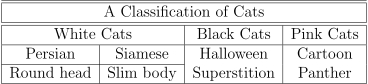
This is the desired result, but we have to know in advance the maximum width (in columns) and use the \multicolumn command repeatedly, where required.
To get the table structure we want, we can replace certain table cells with nested tabular environments:
\begin{tabular}{|@{}c@{}|@{}c@{}|}\hline\hline
\multicolumn{2}{|c|}{A Classification of Cats}\\\hline\hline
    \begin{tabular}{c|c}
       \multicolumn{2}{c}{White Cats}\\\hline
       Persian & Siamese \\\hline
       Round Head & Slim Body \\\hline
    \end{tabular} &
    \begin{tabular}{c|c}
       Black Cats   & Pink Cats\\\hline
       Halloween    & Cartoon\\
       Superstition & Panther\\\hline
    \end{tabular}
\end{tabular}
Here, we use one tabular for white cats and another for black and pink ones.
What does @{} mean? It ensures that the horizontal lines in a nested table extend all the way to the end:
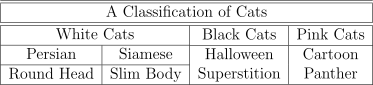
In general, replacing a cell with a nested table gives us great flexibility when creating complex tables.
Sometimes we want to split a cell diagonally:
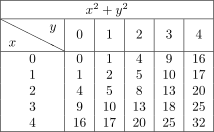
We can do this using the package slashbox, which provides the command:
\backslashbox{LowerText}{UpperText}This command divides a cell with a diagonal line extending from top left to right bottom. It then puts LowerText in the lower left triangle and UpperText in the upper right triangle.
Here’s how we use it to recreate the above table:
\begin{tabular}{|c|c|c|c|c|c|}
\hline
\multicolumn{6}{|c|}{\rule{0pt}{10pt} }\\\hline
\backslashbox{
}\\\hline
\backslashbox{ }{
}{ } & 0 & 1 & 2 & 3 & 4 \\
\hline
0 & 0 & 1 & 4 & 9 & 16 \\
1 & 1 & 2 & 5 & 10 & 17 \\
2 & 4 & 5 & 8 & 13 & 20 \\
3 & 9 & 10 & 13 & 18 & 25 \\
4 & 16 & 17 & 20 & 25 & 32 \\
\hline
\end{tabular}
} & 0 & 1 & 2 & 3 & 4 \\
\hline
0 & 0 & 1 & 4 & 9 & 16 \\
1 & 1 & 2 & 5 & 10 & 17 \\
2 & 4 & 5 & 8 & 13 & 20 \\
3 & 9 & 10 & 13 & 18 & 25 \\
4 & 16 & 17 & 20 & 25 & 32 \\
\hline
\end{tabular}
We need to increase the height of the header column slightly using \rule{0pt}{10pt} (this is called a strut) to accommodate the exponents of  .
.
We now present a complex example involving the \multirow command from the package of the same name. Its syntax is:
\multirow[vert-pos]{num-rows}{width}[vert-adjust]{text}The arguments are:
As an example, we depict animal species and their sub-classes.
The top-level classes are Arthropods, Annelids, Molluscs, Nematodes, and Vertebrates. Since these names are very long, we use \rotatebox{90} from package graphicx to rotate them to save space.
The Arthropods and Vertebrates have 4 and 5 sub-classes. As such, we make the whole table 5 rows high to accommodate both classes horizontally. For clarity, we also use vertical dashed lines, as indicated by “:” from the arydashln package. The idea is to combine the blocks above the sub-classes into one block using \multirow:
\begin{tabular}{|l:l|l|l|l|l:l|}
  \hline
  \multicolumn{7}{|c|}{The Animal Kingdom}\\\hline
  \hline
  \multirow[c]{5}{*}[0in]{\rotatebox{90}{Arthropods}} &
  Archanids &
  \multirow[c]{5}{*}[0in]{\rotatebox{90}{Annelids}}&
  \multirow[c]{5}{*}[0in]{\rotatebox{90}{Molluscs}}&
  \multirow[c]{5}{*}[0in]{\rotatebox{90}{Nematodes}}&
  \multirow[c]{5}{*}[0in]{\rotatebox{90}{Vertebrates}}&
  Amphibians\\
  & Crustaceans & & & & &Birds\\
  & Insects     & & & & &Fish\\
  & Myriapods   & & & & &Mammals\\
  &             & & & & &Reptiles\\
  \hline
\end{tabular}
We obtain the following table:
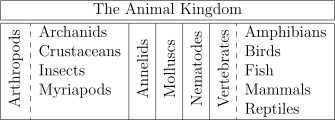
If we wanted to add the sub-classes of Molluscs (there are 7 of them), we’d replace the Molluscs l with l:l in the tabular specification and change multicolumns to 8 and multirows to 7.
In this article, we talked about splitting cells in a LaTeX table. We use \multicolumn to span several columns with a single cell, and \multirow to cover multiple rows with a cell. Similarly, we can use the slashbox package to split a cell diagonally. If our table is very complex, we can even nest tabular environments to get greater flexibility.